HDR Made Simple
Tools that simply work
Foton-HDR
Simple HDR photo enhancement tool with advanced tone mapping. Transform your SDR images into vibrant HDR visuals optimized for modern displays.
Vimple
Lightweight and elegant HDR image viewer for macOS. Clean, distraction-free experience with accurate HDR rendering and smooth navigation.
Gain Map HDR
Advanced gain map technology for true HDR conversion. Transform SDR images with precise luminance control and expanded dynamic range.

iVC-HDR
Intelligent video converter for HDR10. Transform SDR videos with automatic analysis and optimization for modern HDR displays.
Foton-HDR
Simple HDR photo enhancement for everyone

True HDR Conversion
Transform standard JPGs into real HDR (HEIC 10-bit, Rec.2020, PQ) for deeper blacks, brighter highlights, and lifelike color depth.
Intuitive Image Controls
Easily fine-tune brightness, contrast, and color with simple yet precise tools — professional results without complexity.
Batch Processing
Convert multiple images at once with auto 4:5 cropping, perfect for preparing consistent visuals for social media.
Wide Format Support
Work with nearly any format — JPG, JPEG, PNG, HEIC, TIFF, TIF, BMP, GIF, AVIF, WEBP, DNG, NEF, NRW, RW2, CR2, CR3, ARW, RAF, ORF, RWL, and PEF. You can save your edited images as HEIC or PNG.
Overview
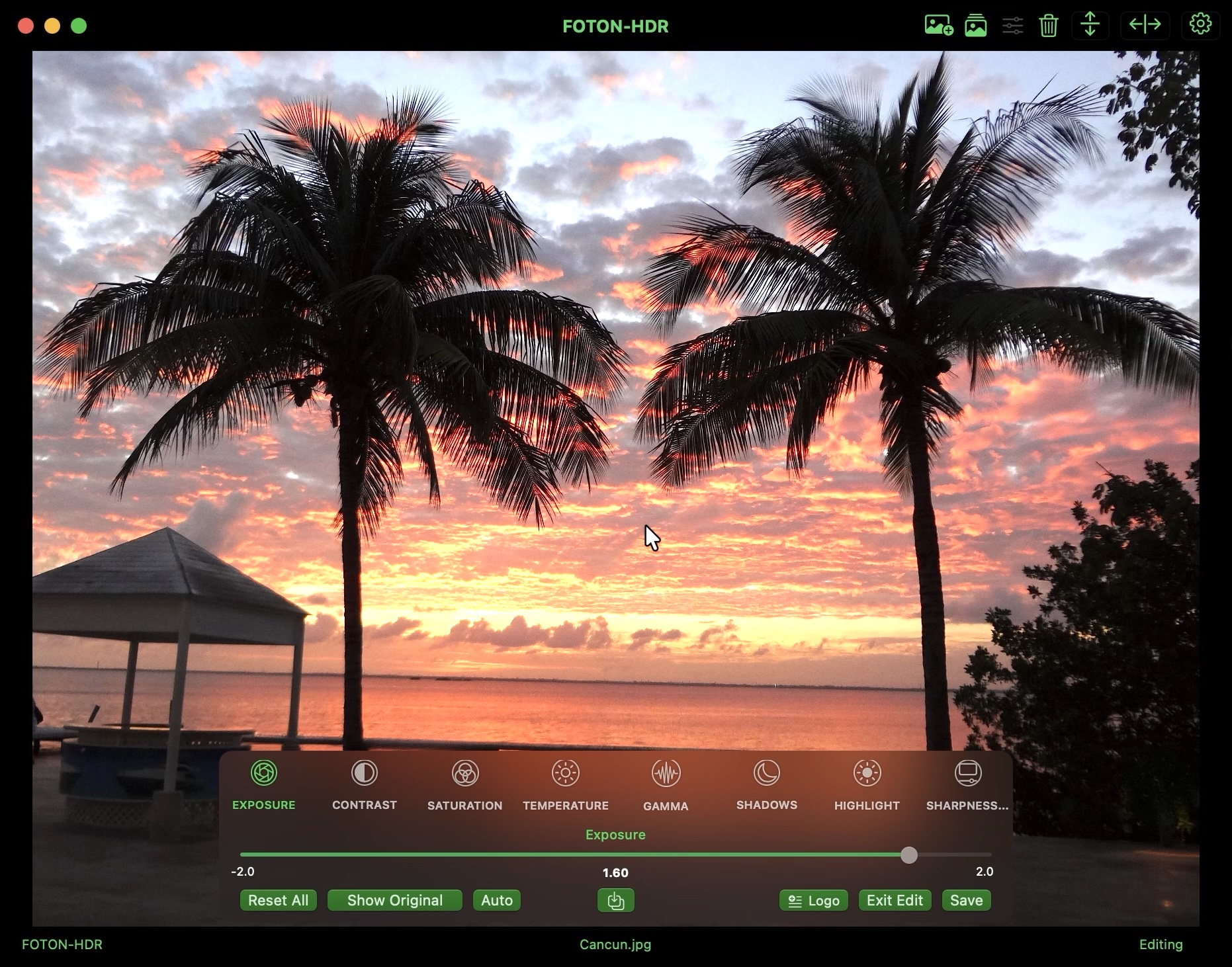
Foton-HDR is an image editing tool designed specifically for HDR photography, allowing you to enhance and adjust your images with easy-to-use controls. Whether you're a professional photographer, an amateur, a photography enthusiast, or simply someone who wants to improve the look of your photos, Foton-HDR makes advanced HDR editing accessible.
With intuitive controls and intelligent adjustments, it transforms standard SDR images into vibrant, high-dynamic-range visuals—ideal for personal projects, social media content, or professional portfolios. Instead of using gain maps, Foton-HDR applies advanced tone mapping techniques to globally enhance brightness, contrast, and color depth through Core Image processing.
Key Features
- Advanced Tone Mapping: Global enhancement of brightness, contrast, and color depth using Core Image processing
- Professional Controls: Adjust exposure, contrast, saturation, temperature, gamma, shadows, highlights, and sharpness
- Batch Processing: Process multiple images simultaneously with automatic adjustments
- Automatic Backup System: Protects original images with complete safety
- PQ Transfer Function: Static HDR images encoded with ST.2084 PQ and Rec. 2020 color space
- HDR Display Optimization: Fully optimized for modern HDR displays
FAQS
Frequently Asked Questions
Your questions, answered.
What is Foton-HDR?
Foton-HDR is an image editing tool designed specifically for HDR photography. It transforms standard SDR images into vibrant HDR visuals using advanced tone mapping techniques. The result is a static HDR image encoded with the PQ transfer function and Rec. 2020 color space—fully optimized for modern HDR displays.
How do I edit an image?
Simply drag and drop an image into the application or use the import button in the toolbar. Once loaded, you can adjust various parameters like exposure, contrast, saturation, temperature, gamma, shadows, highlights, and sharpness intensity.
What are Auto Adjustments?
Auto Adjustments automatically analyzes your image and applies optimal settings for contrast, brightness, saturation, sharpness, tone mapping, and EV adjustments. It's the fastest way to get great results with a single tap.
Can I process multiple images at once?
Yes! Foton-HDR includes batch processing functionality. You can process multiple images simultaneously with automatic adjustments and smart output formatting for maximum productivity.
Vimple
Simple, fast HDR image viewer for macOS
True HDR Display
Experience your HDR images as they were meant to be seen with accurate color reproduction and dynamic range
Exclusive HDR Viewer
Vimple is the only full-screen image carousel viewer for macOS that truly displays images in EDR and HDR
Clean Interface
Minimalist design that puts your images front and center with intuitive navigation and no distractions
Fullscreen Experience
Immersive fullscreen mode for distraction-free viewing of your image collections
Overview
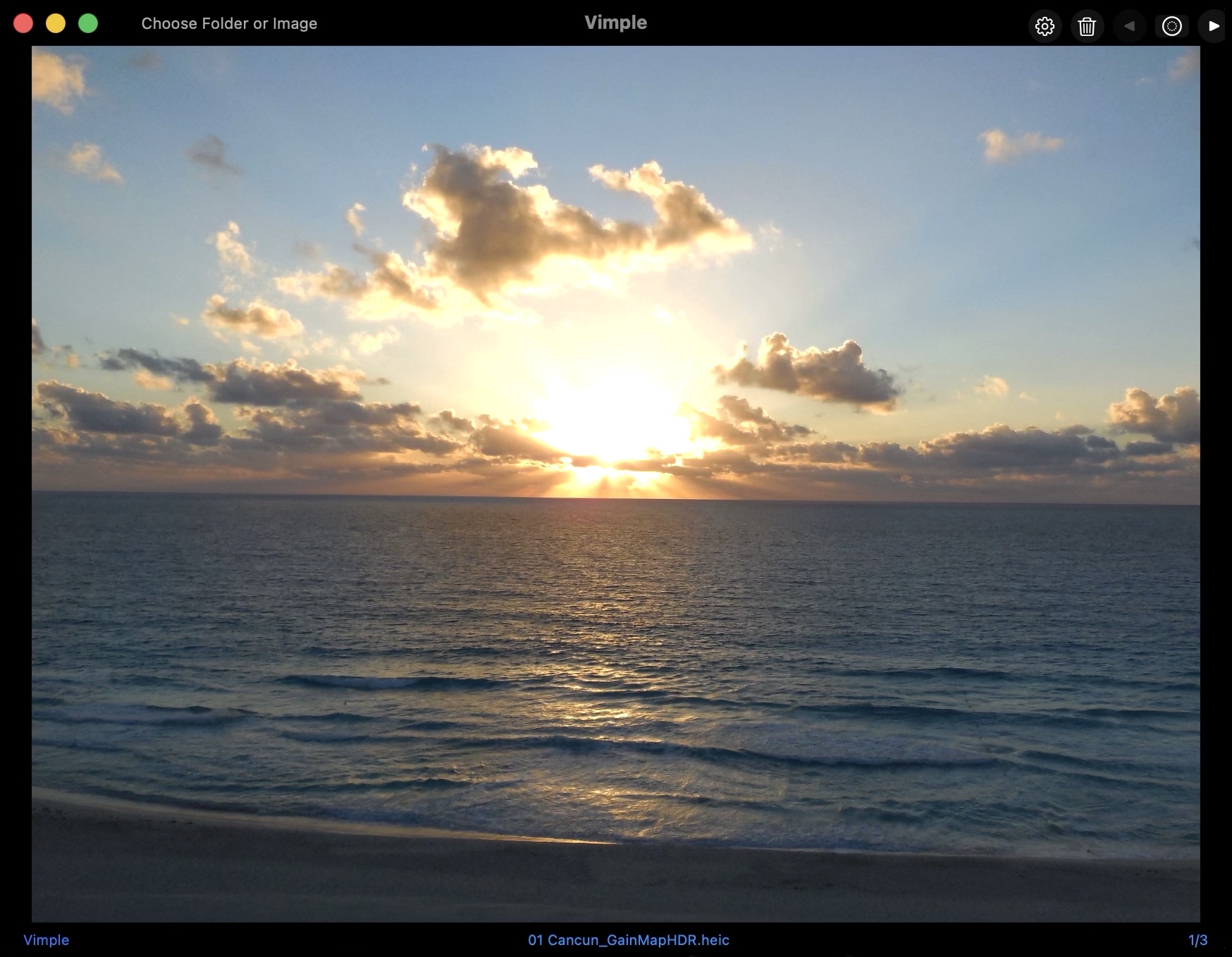
Vimple is a lightweight and elegant image carousel viewer designed exclusively for HDR photos on macOS. Whether you’re a photographer reviewing HDR exports or simply someone who wants to see images as they were meant to be seen, Vimple provides a clean, distraction-free viewing experience.
Focused on doing one thing exceptionally well — displaying your images with true HDR accuracy and smooth navigation — Vimple makes browsing your photo collection effortless.
Key Features
- HDR Support: Accurate display of HDR images with proper tone mapping and color reproduction
- Clean Interface: Minimalist design that focuses on your images without distractions
- Drag & Drop: Easy image loading - just drag files into the window
- Keyboard Navigation: Quick browsing with arrow keys for efficient workflow
- Fullscreen Mode: Immersive viewing experience with double-click activation
- Lightweight: Fast performance without unnecessary features or complexity
FAQS
Frequently Asked Questions
Your questions, answered.
What is Vimple?
Vimple is a simple, fast image carousel viewer designed specifically for HDR images on macOS. It provides an elegant, distraction-free viewing experience with accurate HDR rendering and smooth navigation between images.
What image formats does Vimple support?
Vimple supports all common image formats including HDR formats like HEIC with gain maps, as well as standard formats like JPG, PNG, and TIFF. It's optimized for proper HDR display on compatible displays.
How do I navigate through images?
You can use the arrow keys on your keyboard to move between images, or click on the navigation buttons in the interface. The experience is designed to be smooth and intuitive.
Does Vimple modify my images?
No, Vimple is a viewer-only application. It does not modify, edit, or alter your original images in any way. It's designed purely for viewing and reviewing your image collection.
Gain Map HDR
Transform SDR images into true HDR using advanced gain map technology
Advanced Gain Map Technology
Convert SDR images into true HDR with expanded dynamic range and precise luminance control
HDR & HDR+ Modes
Choose between normal HDR enhancement or HDR+ mode with 43% more luminance in highlights for extra visual impact
Batch Processing
Convert multiple images simultaneously with automatic gain map creation and smart memory optimization
Broad Format Support
Import over 20 professional image formats — including RAW files (DNG, CR3, NEF, ARW, and more) — and export true HDR results in HEIC with embedded gain maps
Overview
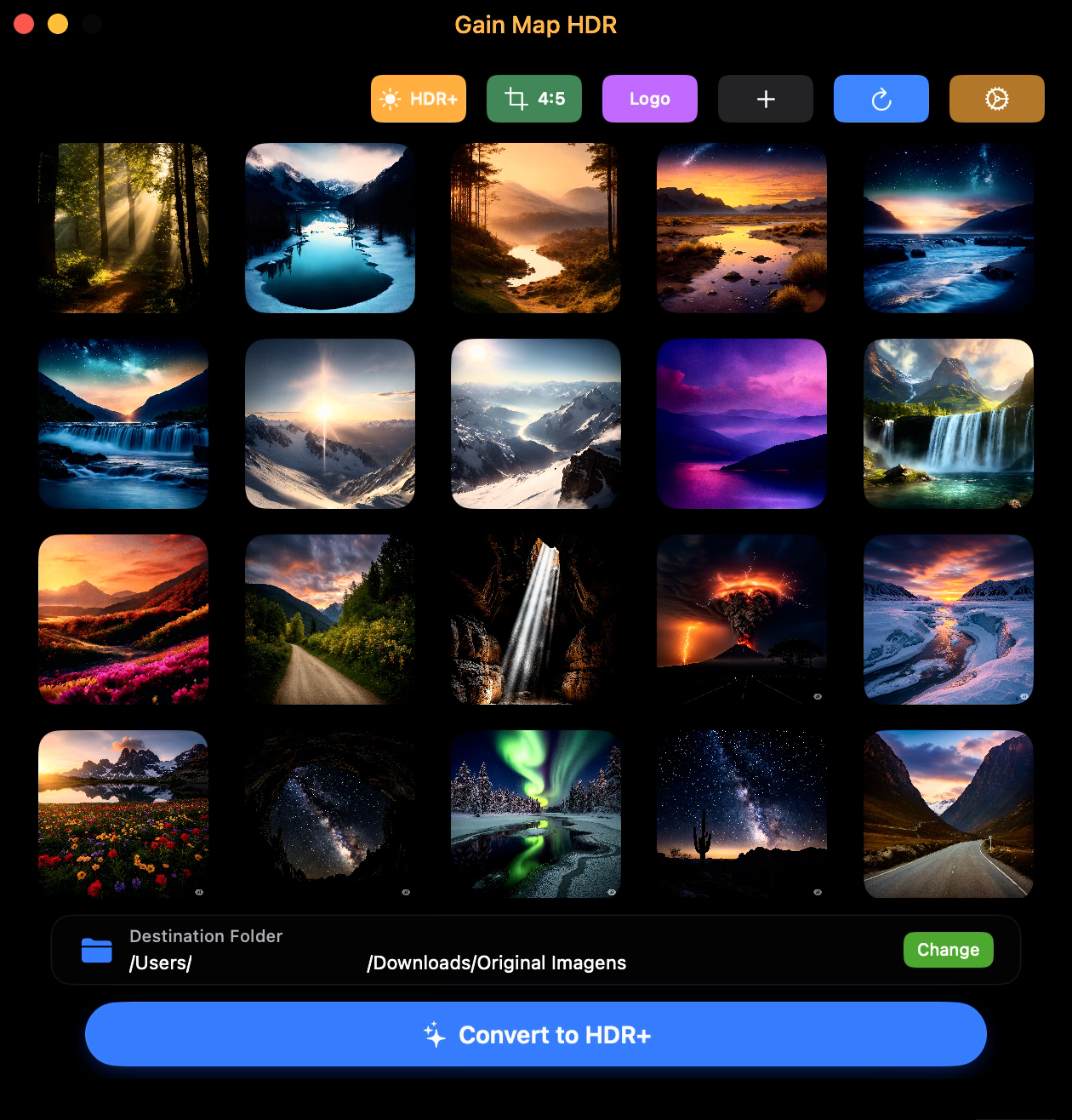
Gain Map HDR is a specialized image conversion tool that transforms standard SDR (Standard Dynamic Range) images into HDR (High Dynamic Range) images using advanced gain map technology. Unlike traditional tone mapping approaches, our software generates a grayscale gain map that provides precise luminance control, creating authentic HDR images with expanded dynamic range.
The gain map technology works by creating a grayscale map that stores luminance multiplier information for each pixel. This map is combined with the base image to reconstruct the full HDR information, allowing for a much wider range of brightness levels than traditional SDR images. The result is more realistic lighting, better shadow detail, and enhanced highlight information optimized for modern HDR-capable displays.
Key Features
- Advanced Gain Map Technology: Precise luminance control with grayscale gain map generation
- HDR & HDR+ Modes: Choose between normal or enhanced mode with 43% more highlight luminance
- Batch Processing: Convert multiple images simultaneously with professional workflow support
- 4:5 Cropping: Optional aspect ratio conversion for social media optimization
- Watermark Support: Built-in watermarking for content protection
- Wide Format Support: 20+ professional image formats including RAW from major camera manufacturers
- HEIC Output: Standard format for HDR images on Apple devices and modern platforms
FAQS
Frequently Asked Questions
Your questions, answered.
What is Gain Map HDR?
Gain Map HDR is a powerful yet simple image converter that transforms standard SDR photos into true HDR using advanced gain map technology. It creates authentic high-dynamic-range images optimized for modern HDR displays.
How does gain map technology work?
Gain Map HDR generates a grayscale “gain map” that stores pixel-by-pixel brightness data. When combined with the base image, it restores full HDR luminance and contrast — resulting in richer highlights, deeper shadows, and more natural lighting.
What is the difference between Gain Map HDR and traditional tone mapping?
Tone mapping simulates HDR by adjusting global brightness and contrast. Gain Map HDR, however, produces true HDR by embedding per-pixel luminance data. The result is greater precision, realism, and compatibility with real HDR workflows.
How do I convert images to HDR?
Simply drag and drop your images or folders into the app, choose a destination, and click Convert to HDR. You can also enable HDR+ mode, 4:5 crop, or watermark options for a customized conversion experience.
What file formats are supported?
Gain Map HDR supports 20+ professional image formats for input including JPG, JPEG, PNG, HEIC, HEIF, TIFF, BMP, GIF, and professional RAW formats from major camera manufacturers (DNG, CRW, CR2, CR3, ERF, RAF, DCR, RAW, NEF, NRW, ORF, RW2, PEF, SRW, SR2, ARW). Output is always saved as HEIC format with embedded gain map data.
What is the difference between HDR and HDR+ modes?
HDR (Normal): Balanced enhancement for a natural look. HDR+ (Enhanced): Boosts highlights by about 43% for extra “pop” in bright areas — perfect for skies, reflections, and lights.
iVC-HDR
Intelligent Video Converter to HDR - Transform SDR videos into HDR10
Automatic SDR to HDR10 Conversion
Effortlessly transform SDR videos into true HDR10 with intelligent exposure, contrast, and color optimization — powered by smart image analysis and real HDR10 metadata
Hardware-Accelerated Performance
Enjoy ultra-fast conversions with full HEVC hardware encoding support on Apple Silicon and Intel Macs with dedicated GPUs, optimized for 4K and 10-bit video
Built-in Watermark System
Add your own brand or logo directly to converted HDR videos with adjustable opacity, scale, margins, and five preset positions
Designed for Real Results, Not Complexity
iVC-HDR focuses on consistency, speed, and visual quality instead of over-engineered AI tone mapping — delivering natural, reliable HDR enhancement every time
Overview
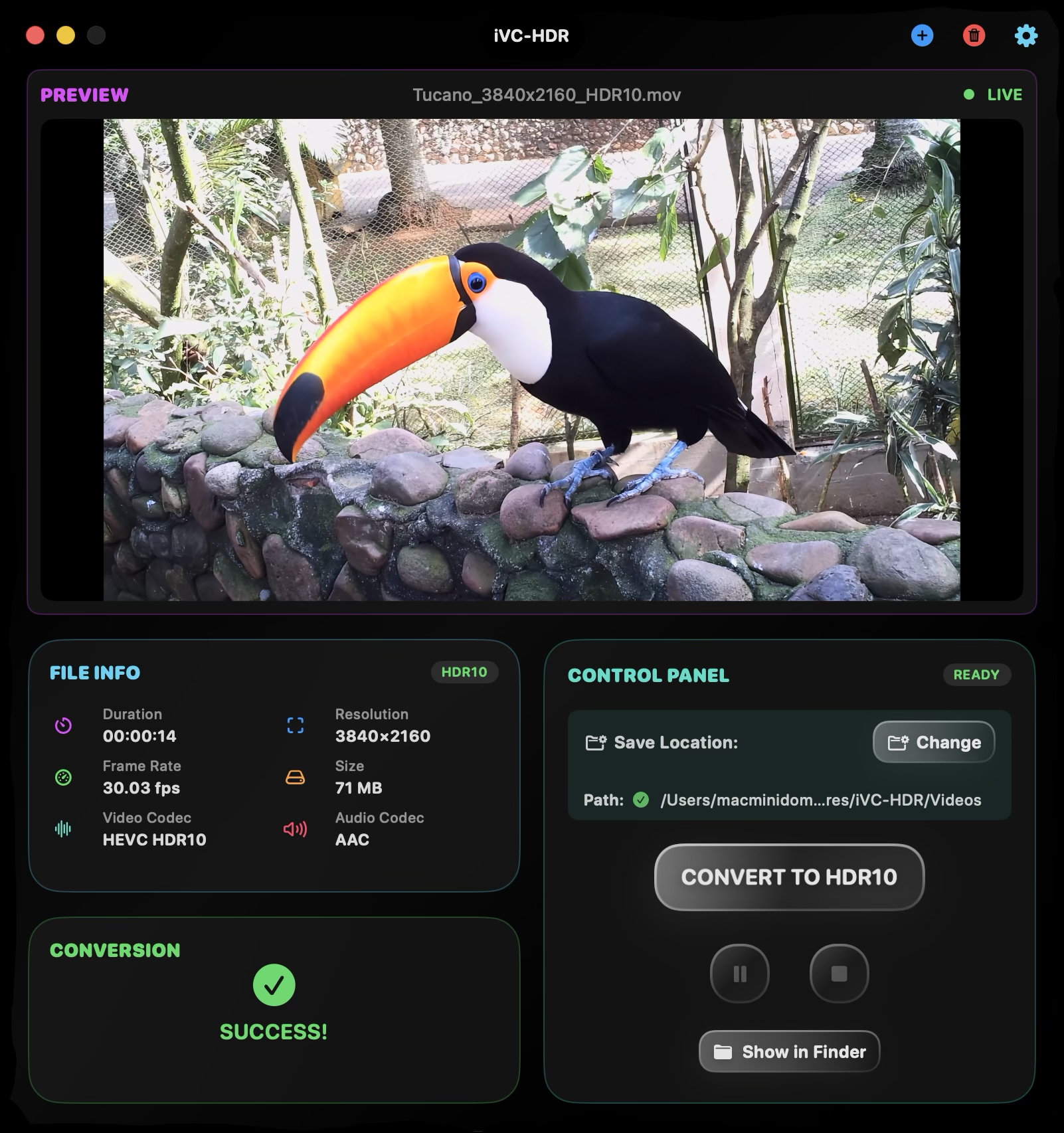
iVC-HDR is a specialized video converter that transforms SDR (Standard Dynamic Range) videos into HDR10-compatible format, focusing on simplicity and practical results. The app automatically analyzes your SDR video and applies a series of intelligent optimizations—adjusting exposure, contrast, saturation, and black levels—then re-encodes the video in HDR10 standard with expanded color space (Rec. 2020) and appropriate HDR metadata.
While many HDR solutions depend on AI-based scene interpretation and intricate tone mapping, iVC-HDR takes a streamlined adaptive approach that combines automatic image corrections with HEVC re-encoding in ITU-R 2020 color space using ST.2084 PQ transfer function and HDR10 metadata (MaxCLL/MaxFALL). The result is a video that better takes advantage of modern HDR displays’ capabilities.
Key Features
- Intelligent Automatic Correction: Analyzes and applies optimal adjustments for exposure, contrast, and color
- Dynamic HDR Analysis: Smart pipeline decision system for consistent, predictable results
- True HDR10 Output: ST.2084 PQ transfer function with ITU-R 2020 color space
- Hardware Acceleration: HEVC encoding optimized for Apple Silicon and modern Macs
- Watermark Support: Customizable watermarking with opacity, scale, margin, and position controls
- Conversion Control: Pause, resume, or cancel conversions at any time
- Wide Format Support: MP4, M4V, MOV, MPEG, MTS, M2TS, TS, and VOB input formats
- Audio Compatibility: Supports AAC, AC-3, E-AC-3 audio formats
FAQS
Frequently Asked Questions
Your questions, answered.
What is iVC-HDR?
iVC-HDR is a specialized video converter that transforms SDR videos into HDR10-compatible format. It automatically analyzes your video and applies intelligent optimizations (exposure, contrast, saturation, black levels), then re-encodes in HDR10 standard with Rec. 2020 color space and ST.2084 PQ transfer function. The app prioritizes consistency, speed, and predictable results over complex AI algorithms.
How do I convert videos to HDR?
Simply drag and drop your video file into the application or use the Import button. iVC-HDR will automatically analyze and process your video internally—adjusting exposure, contrast, and color levels as needed. When ready, click ‘CONVERT TO HDR10’, and the app will process your video with the determined optimizations, saving it as an HDR10-compatible MOV file.
What video formats are supported?
iVC-HDR supports MP4, M4V, MOV, MPEG, MTS, M2TS, TS, and VOB for input. For audio, it supports AAC, AC-3, E-AC-3, and videos without audio. The output is always saved as MOV with HEVC (H.265) encoding and true HDR10 metadata including ST.2084 PQ transfer function, ITU-R 2020 color space, and proper mastering display metadata.
Can I pause or cancel an ongoing conversion?
Yes! iVC-HDR provides full conversion control. During conversion, you'll see Pause/Resume and Cancel buttons in the Control Panel. You can pause to suspend processing (which can be resumed later with no quality loss), or cancel to immediately stop and clean up all temporary files. The app performs automatic cleanup when you cancel.
How long does video conversion take?
Conversion time varies based on resolution, length, codec, and hardware. Average times on Apple Silicon: 1080p AVC (~10 min video in ~1 min), 1080p HEVC (~10 min in 30-35 sec), 4K AVC (~10 min in 3-4 min), 4K HEVC (~10 min in 3-3.5 min). The app shows real-time track progress in-app and on the Dock icon.
Where are converted videos saved?
Due to macOS security requirements, you need to choose a destination folder when loading your first video. This choice is remembered for future conversions. Converted videos are saved with '_HDR10' appended to the original filename. For example, 'myvideo.mov' becomes 'myvideo_HDR10.mov'.
HDR Comparison Gallery
Note: To properly view the difference between SDR and HDR images, your device (smartphone, tablet, or Mac/PC) must support HDR display. For the best experience, use Google Chrome, as other browsers may not render HDR content correctly. Without HDR support, the images will look identical.

 SDR
HDR
SDR
HDR

 SDR
HDR
SDR
HDR

 SDR
HDR
SDR
HDR

 SDR
HDR
SDR
HDR

 SDR
HDR
SDR
HDR

 SDR
HDR
SDR
HDR

 SDR
HDR
SDR
HDR

 SDR
HDR
SDR
HDR
About the Developer
Hi, I'm the creator behind Inphovid. With a passion for visual storytelling that spans from the film era to modern digital photography, I've dedicated my career to making professional image enhancement accessible to everyone.
As an Apple Developer, I focus on creating native macOS applications that leverage the full power of Apple Silicon while maintaining the simplicity and elegance that Mac users expect.
Every app I build reflects my belief that powerful tools should be intuitive, that privacy matters, and that your creative vision deserves the best technology available.
End User License Agreement
For Inphovid Applications | Last updated: November 04, 2025
IMPORTANT: PLEASE READ THIS LICENSE CAREFULLY BEFORE USING THIS SOFTWARE.
1. Parties
This End User License Agreement ("EULA") is a legal agreement between you (the "User") and Inphovid / Marcelo Pitz Espindola (the "Licensor"), the developer of the Software applications ("Software").
By installing, copying, or using any Inphovid Software, you agree to be bound by the terms of this EULA. If you do not agree, delete the Software and all related files immediately.
2. License Grant
By receiving, opening the file package, and/or using any Inphovid Software, you agree that this EULA is a legally binding and valid contract. If you do not agree to the terms of this Agreement, promptly delete the Software and related files.
The Licensor grants you a personal, non-transferable, non-exclusive license to use the Software on your devices in accordance with the terms of this EULA. You are permitted to:
- Install and use the Software on Mac computers under your control
- Process your own media files using the Software
- Create content for personal or commercial use
- Use the Software features as intended by the application design
You are responsible for ensuring your device meets the minimum requirements of each Software application.
3. Restrictions
You may NOT:
- Charge others for use of or access to this Software
- Distribute, rent, sub-license, or lease the Software
- Modify, adapt, translate, reverse engineer, decompile, or disassemble the Software
- Remove or alter any copyright, trademark, or proprietary notices
- Use the Software for any illegal purposes
- Redistribute or host the Software installer on any platform without written permission
4. Ownership
The Software is licensed, not sold. Inphovid retains all rights, title, and interest in and to the Software, including all intellectual property rights. All Inphovid applications, content, and trademarks are protected by copyright.
5. Updates and Support
We may provide you with updates to the Software that must be installed for you to continue using the Software. We may update the Software at any time, at our sole discretion. Technical support is provided on a voluntary basis via email at inphovid@gmail.com.
6. Data and Privacy
Inphovid Software applications process files locally on your device. No content or personal data is transmitted to our servers unless explicitly stated in the specific application. For complete details, please review our Privacy Policy.
7. Termination
The license is effective until terminated. You may terminate it by destroying the Software and related materials. It will also terminate automatically if you fail to comply with any term or condition in this license agreement. Upon termination, you agree to destroy all copies of the Software.
8. Disclaimer of Warranty
THE SOFTWARE IS PROVIDED "AS IS", WITHOUT WARRANTY OF ANY KIND, EXPRESS OR IMPLIED, INCLUDING BUT NOT LIMITED TO THE WARRANTIES OF MERCHANTABILITY, FITNESS FOR A PARTICULAR PURPOSE AND NONINFRINGEMENT. IN NO EVENT SHALL THE AUTHORS OR COPYRIGHT HOLDERS BE LIABLE FOR ANY CLAIM, DAMAGES OR OTHER LIABILITY, WHETHER IN AN ACTION OF CONTRACT, TORT OR OTHERWISE, ARISING FROM, OUT OF OR IN CONNECTION WITH THE SOFTWARE OR THE USE OR OTHER DEALINGS IN THE SOFTWARE.
9. Limitation of Liability
IN NO EVENT SHALL INPHOVID BE LIABLE FOR ANY SPECIAL, INCIDENTAL, INDIRECT, OR CONSEQUENTIAL DAMAGES WHATSOEVER (INCLUDING, WITHOUT LIMITATION, DAMAGES FOR LOSS OF BUSINESS PROFITS, BUSINESS INTERRUPTION, LOSS OF BUSINESS INFORMATION, OR ANY OTHER PECUNIARY LOSS) ARISING OUT OF THE USE OF OR INABILITY TO USE THIS SOFTWARE.
10. Governing Law
This Agreement shall be governed by applicable laws, without regard to conflict of law principles or specific jurisdiction.
11. Entire Agreement
This EULA constitutes the entire agreement between you and Inphovid regarding the Software and supersedes all prior agreements and understandings.
12. App Store Distribution
If you obtained the Software through the Mac App Store, this EULA applies in addition to Apple's standard End User License Agreement. In case of conflict, the more restrictive terms shall apply.
Privacy Policy
For Inphovid Applications | Last updated: November 04, 2025
Introduction
Thank you for choosing Inphovid applications. We are committed to protecting your privacy and ensuring that your personal information remains secure. This Privacy Policy describes how we collect, use, and share information when you use our software applications.
Developer: Inphovid / Marcelo Pitz Espindola
Contact: inphovid@gmail.com
Our Privacy Commitment
Inphovid applications are designed with privacy as a fundamental principle. We believe your data belongs to you, and we build our software to respect that principle.
Information We Collect
We collect minimal information, only when necessary:
- Anonymous Usage Data: Some apps may collect anonymous, aggregated usage statistics to improve performance and user experience
- Contact Information: Only if you voluntarily contact us via email for support or inquiries
- No Personal Data: We do not collect names, addresses, phone numbers, or other personally identifiable information
How Our Software Works
Local Processing
- Most Inphovid applications process files locally on your device
- Your content (videos, images, documents) never leaves your device unless explicitly required by the app's functionality
- Apps work offline whenever possible
File Access and Storage
- Apps require permission to access folders you explicitly select (macOS security requirements)
- Settings and preferences are stored locally on your device
- You maintain complete control over your files and can revoke access anytime
Data We Do NOT Collect
We do NOT collect or transmit:
- Your media files or content you process
- Detailed usage statistics or user behavior tracking
- Location data
- Device identifiers or fingerprinting data
- Credit card or payment information (handled by Apple)
Third-Party Services
Inphovid applications do not integrate with third-party analytics platforms, advertising networks, or data collection services. We do not share your information with third parties.
Data Security
Since most processing happens locally and we collect minimal data:
- Your files remain under your complete control
- Minimal risk of data breaches
- Your privacy is protected by your device's built-in security features
Children's Privacy
Our applications are not directed to children under the age of 13, and we do not knowingly collect personal information from children under 13.
Your Rights
You have the right to:
- Access any data we may have collected (minimal as described above)
- Request deletion of any data
- Opt-out of any data collection (where applicable)
- Contact us with privacy concerns
App Store Purchases
If you purchase apps through the Mac App Store, your payment and personal information is handled exclusively by Apple. We do not have access to your payment information or Apple ID details.
Updates and Changes
Software updates may be distributed through the Mac App Store or direct download. Updates do not collect or transmit additional data beyond what is described in this policy.
We may update this Privacy Policy from time to time. Changes will be posted with an updated "Last updated" date. Continued use after changes indicates acceptance of the updated policy.
Legal Compliance
This Privacy Policy is designed to comply with:
- General Data Protection Regulation (GDPR) - European Union
- California Consumer Privacy Act (CCPA) - United States
- Other applicable privacy laws worldwide
International Users
Our applications are available worldwide. Since data is processed locally on your device, data sovereignty concerns are minimized. Any data that may be transmitted is handled in accordance with applicable laws.
Severability
If any provision of this Privacy Policy is found invalid, the remaining provisions shall continue to apply in full force and effect.